
The Curl Edit

Made for your routine.Hair oil setGHS 120.00
01
Your business, online.
Give your products a home. Share your shop or a Buy link wherever your customers find you.
Explore online sellingSay no more! Share a Buy link now—for free. 😎
Start with a shop, a Buy link, or an invoice. Bring more of your business into Inttegro as you grow.
Give your products a home. Share your shop or a Buy link wherever your customers find you.
Explore online sellingHair oil setQuantity 1Give customers a simple way to pay. Keep the order, payment, and customer together.
Explore paymentsSee what’s selling. Decide what to stock, share, or promote next.
Explore sales analyticsBuild a catalog of goods and services, set fixed prices or let customers choose an amount, and create offers with coupons and promotions.
Explore catalog & offers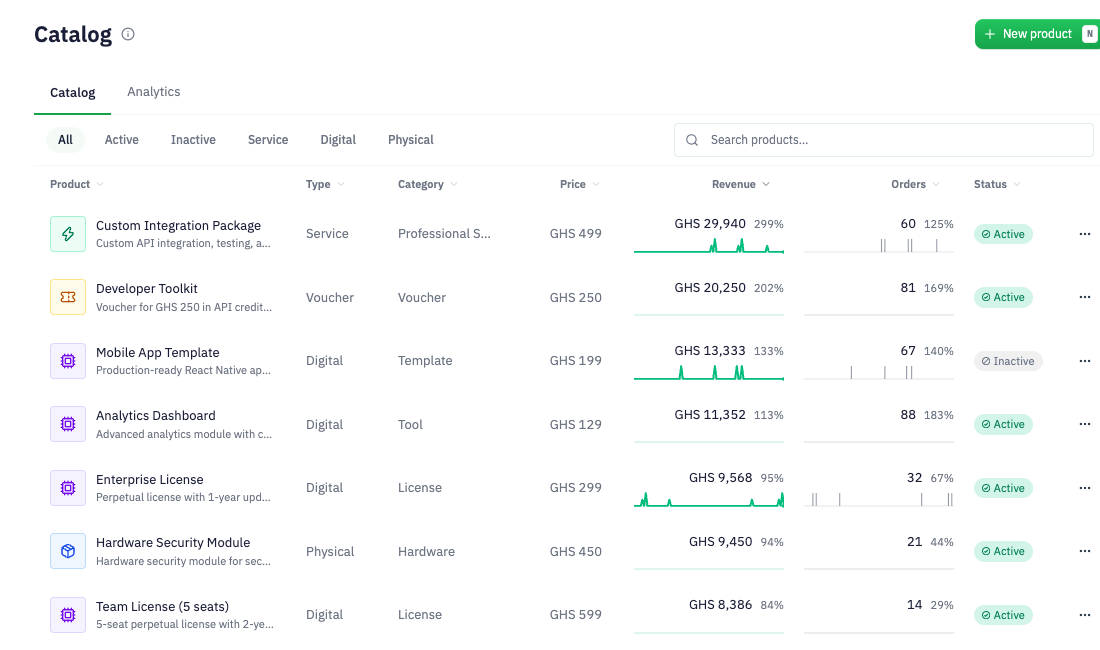

01 / Selling
Open your online shop, share a Buy link in a message or on your website, send a hosted invoice for an agreed order, or add Checkout to your application. Customers get a place to browse, review and pay; your team follows the sale in Inttegro.
Use Shop to give customers a storefront where they can browse products and build a cart. Share a Buy link for a specific offer. Send an invoice when you have already agreed the order. For your own website, embed Checkout in the page or open it in a modal.
Explore payment options
02 / Money
See how much is available to withdraw and what is still pending or reserved. Open a payout to check its destination, progress and the transactions behind it, so your finance team can reconcile the money after a sale.


03 / Customers & messaging
Find a customer’s contact details and purchase history when they need help or return to buy. Chimes, Inttegro’s messaging tools, lets your team or application send receipts and updates, reach groups of customers with broadcasts, and schedule messages for later.
Explore Chimes

04 / Analytics
What sold, how many orders were paid, and which customers came back? Compare reporting periods, explore product and customer performance, and inspect the orders behind the numbers. Dashboard activity and sales created through the API contribute to the same reports.
AI integrations
Connect an assistant to review sales and handle confirmed tasks, equip a coding agent with Inttegro skills, or plan an integration with your app builder.
Explore Inttegro for AIget_order
APIs & SDKs
Create orders, maintain the catalog or update customer details from your own software. Your team can find those records in the Inttegro dashboard to support customers and manage the sale. APIs, SDKs and integration guides help you connect an existing system or build a new one.
Explore Inttegro for developersAccounts, pricing & availability
Create an account and add a product with its price, then prepare a Buy link to share. If you already have an agreed sale, create a customer order and its hosted invoice. You can do this in the dashboard or build it into your application through the API.
Explore Buy linksNo. Your team can manage the catalog, prepare orders, share hosted payment pages and review reporting in the dashboard. Developers can use the API when you want to connect an existing system or build a checkout into your own website or app. Both work with the same business records.
Explore the developer toolsPercentage-based pricing, with custom options for enterprise needs. Talk to us about pricing for your business.
Discuss pricingCreating an account is separate from payment activation. Available payment methods, currencies and verification requirements depend on your account and setup.
Check availability for your businessYour next step
Create an account to add your products or prepare a customer order. If you’re integrating an existing website or app, explore the developer tools before you build.
Business homepage


